Hi everyone
I'd like to share a free theme I built: SnowFlat Modern — a modern, professional reskin of the classic SnowFlat theme, rebuilt for a cleaner 2026 look while keeping everything you already love about SnowFlat.
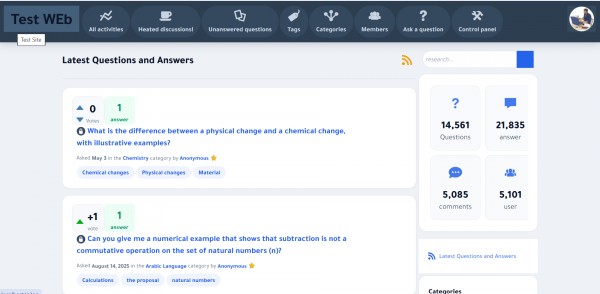
The original SnowFlat still looks great, but its flat-2014 palette and typography feel a little dated. SnowFlat Modern fixes that with a refined design system — without touching the original theme.
✨ What's new
Refined color system — a coherent blue / slate palette .
Card-based layout — questions, answers and widgets are now clean cards with soft shadows, rounded corners and subtle hover lift.
Polished top bar — dark slate gradient header with rounded nav icons.
Unified stat tiles — the activity-count widget is now a tidy, consistent grid instead of four clashing colors.
Better typography — ships with the elegant Tajawal font, which also renders Arabic beautifully (the original Ubuntu font doesn't).
Full RTL support — designed and tested for Arabic/RTL out of the box.
⚡ Non-destructive — all enhancements live in a single snowflat-pro.css layer loaded last, with automatic cache-busting (filemtime). The base qa-styles.css is untouched, so it's easy to maintain and update.
Installation
- Download and unzip into your qa-theme/ folder (you'll get a snowflat-modern/ folder).
- Go to Admin → Layout (or General) and select SnowFlat Modern.
- Done — hard-refresh (Ctrl+Shift+R) and enjoy.
✅ Compatibility
Q2A 1.7+ (tested on 1.8.8)
Desktop + mobile, LTR + RTL
License
GPLv2 — free for personal and commercial use. Based on SnowFlat by Q2A Market (credit retained).
⬇️ Download
Click Here
Feedback, bug reports and suggestions are very welcome — I'll keep it updated.
